CCNA Class 03: Physical Media in Computer Networking
Physical Media in Computer Networking
Physical Media refers to physical materials that are used to store, transmit or receive information in Data Communications.
Some examples of Physical Media -
Transmission Media
Wireless Media
Microwaves
In Network Communication, Transmission Media is a physical connection or an interface between the transmitter and the receiver. There are two major categories of transmission media, namely guided and wireless (or unguided).

There are different types of Guided Transmission Media -
Coaxial Cable: The coaxial cables have a central copper conductor, surrounded by an insulating layer, a conducting shield, and the outermost plastic sheath. Thus, there are three insulation layers for the inner copper cable. It’s referred to as Coax. There are two basic types of coaxial cables: - Thicknet Coaxial cable, and Thinnet Coaxial Cable. Thinnet Coaxial Cable referred to as RG-58 (Radio Grade 58), thinnet is flexible, 0.64cm thick and Thicknet Coaxial cable referred to as RG-8, its rigid and 1.27cm thick. For Example, Cable TV and analog televisions mainly use coaxial cables RG-59 or RG-6. Bayonet Neill–Concelman (BNC) is the Connector of Coaxial Cable.


Advantages: -
The coaxial cables are used for long-distance communication.
Less affected by noise or crosstalk or electromagnetic interference.
Coaxial cables are more reliable and durable.
Coaxial cables support multiple channels.
The plastic Jacket cover consists of a Teflon (PVC) metal shield and it’s referred to as plenum-rated-coating.
Disadvantages: -
Coaxial cables are expensive.
The coaxial cable must be grounded in order to prevent any crosstalk.
2. Twisted Pair Cable: The twisted pair is a widely used medium in networking because it's lighter, cheaper, more flexible, easy to install, and provides greater speeds than coaxial cables. Twisted Pair cable Categories are- Cat1, Cat2, Cat3, Cat4, Cat5, Cat5e, Cat6, Cat6a. There are two types of twisted pair cables: Unshielded Twisted Pair (UTP) and Shielded Twisted Pair (STP).
The Unshielded Twisted Pair (UTP) cable has 4 pairs of copper wires that are present inside a plastic sheath. These wires are twisted to protect them from interference (EMI).

Advantages: -
Least expensive.
Easy to install
High-speed capacity
Disadvantages: -
Lower capacity and performance in comparison to STP.
Short-distance transmission due to attenuation.
The Shielded Twisted Pair (STP) cable is widely used in high-speed networks. The major difference between UTP and STP is the use of a metallic shield to wrap around the twisted pair of wires.

Advantages: -
This metallic shield prevents interference to a better extent than UTP.
Better performance at a higher data rate in comparison to UTP.
Comparatively faster.
Disadvantages: -

Comparatively difficult to install and manufacture.
More expensive.
Twisted Pair cable Connectors are RJ45 & RJ11
(RJ Stands for Registered Jack)
3. Fiber Optics Cable: Optical fiber is a thin and flexible piece of fiber made of glass or plastic and conducts pulses of light, with each pulse representing a bit. Unlike copper wire, optical fiber is typically used for long-distance data communications, being that it allows for data transmission over far distances and can produce high transmission speeds. There are two major types of optical fiber - Single Mode Fiber (SMF) & Multi Mode Fiber (MMF).


Difference Between SMF & MMF: -

Wiring Standards -
Ethernet cabling is an important thing to understand, Especially if you are planning to work on any type of LAN. There are different types of wiring standards available.
568A
568B
Straight-Through
Crossover
568A vs 568B Standard Color Code -

Straight-Through, Crossover cable Wiring


Cable Wiring Standards based on Network Devices -

Wireless Media: -
It’s referred to as Unguided Media traverses data through the air, vacuum or water. For example, Infrared wave, Radio wave, and Microwave.
Features -
No physical medium is required for transmission.
It can travel large distances but it is also less secure.
It can carry signals through air, water, or vacuum.

Common Network Connectivity Devices -
HUB
Bridge
Basic Switch
Basic Router
Basic Firewall
Other Specialized Devices
HUB
HUB is a Networking device that connects multiple devices with a Star configuration.

HUB works in the Physical Layer (Layer 1) of OSI Reference Model and They have multiple input/output (I/O) ports, and data sent to one port is forwarded/broadcast to all other ports and connected devices.
HUB has been considered as obsolete from 2011 by the IEEE. Nowadays, it isn't used in the Core Network System of Enterprise Network.
Bridge
When multiple LANs are connected together with a larger LAN (Local Area Network). The Concept of network propagation is called Bridging and the physical component called Bridge.

The work of Bridge, while receiving any frame by Source host, will forward after checking the destination host address.
Basic Switch
Switches can be used to connect many devices, including computers, servers, and virtual machines in any Topology configuration. They can also be used to create virtual networks, which can isolate groups of systems from each other. Basically, Switch Operates in the Data Link Layer (Layer 2) of OSI reference Model.

There are two types of Switches -
Unmanaged Switches, These are plug and play switches for basic network and connectivity.
Managed Switches, these are manually configured for security & flexibility purposes for particular networks.
Work Functionality of Switches -
Receiving Data Packets, while receiving the data packet from Source address to a port, It examines the MAC Address of the destination host.
Determining the Destination, in the ARP table, lookup the Destination Host MAC Address first. If not found, It will broadcast data packets to all ports of switches and update the ARP table.
Forwarding the Packets, the Data packets send to the correct destination host. If the Destination Address is on a different network, data will be sent to the router to serve this purpose.
Maintaining the MAC Address table, After completing the communication of all of the devices to each other, the MAC Address will be added into the MAC table.
Basic Router
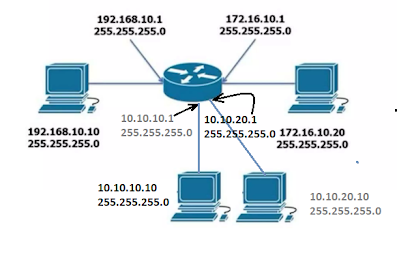
Router is the Network Layer (Layer 3) device of OSI reference Model that communicates the multiple subnetwork devices and transfers the data packets to each other. On the other hand, Routers connect Computers and other devices to the Internet. For Example, Wired router and Wireless router.
The Router works as it receives the Data Packets from the Source Host address. Managing the routing table and determining the best network path for traversing the data to the destination host address and finally, forwarding the data packets to the appropriate network segments.
The main functionality of the Router is to manage traffic between networks and allow multiple devices to use the same internet connection. Routers can also protect information from security threats and decide which computers get priority over others.
Basic Firewall
A firewall is a security system that prevents unauthorized access from an external network to an internal network. The traditional firewall is the concept of IDS (Intrusion detection system) and IPS (Intrusion prevention system) for incoming and outgoing traffic from network to network. The firewall works with Packet filtering, Stateful inspection, and Security rules.

There are a few types of firewalls - Hardware, Software, and Cloud-based firewalls.
NGFW or UTM firewalls have at least two network connections. One to the internet (Public side) and one to the network (Private side). The Intermediary network between the public side and private side is called DMZ. DMZ stands for Demilitarized Zone.
Modem

It stands for Modulator and Demodulator. Converting the digital signal to analog signal and analog to digital signal while connecting to the internet with the device.
DHCP Server
DHCP Server stands for Dynamic Host Configuration Protocol. A DHCP server is a network server that automatically assigns IP addresses and other network configuration parameters to devices on a network, allowing them to communicate efficiently.

Work Functionality of DHCP Server -
Discover: When a device connects to a network for the first time or needs a new IP, it sends out a DHCP Discover message as a broadcast request to find an available DHCP server.
Offer: The DHCP server responds with a DHCP Offer message, suggesting an available IP address and other network details (like subnet mask, gateway, and DNS servers).
Request: The device sends a DHCP Request message back to the server, indicating that it accepts the offered IP address and configuration details.
Acknowledge: The DHCP server finalizes the process with a DHCP Acknowledge message, confirming the IP allocation. The device can now use the assigned IP and network settings.

Comments
Post a Comment
Thanks